Room Property
The dialog for showing the properties for a room is opened by right-clicking the room in the tree structure and selecting the entry Property.
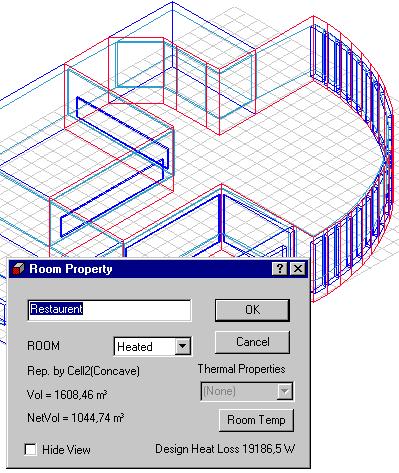
- ROOM: Describes to the Bv98 program the temperature of the room.
- Rep. by shows which cell represents the room and if the room is Convex or Concave. It is not possible to calculate daylight in SimLight or longwave radiation exchange in concave rooms - tsbi5 es these calculations off in concave rooms.</
- Vol = indicates the gross volume (inside the system lines) of the cell.
- NetVol = indicates the net volume of the cell (internal measures).
- Thermal Properties: Describes the thermal properties of spaces located outside thermal zones. Can be used to describe virtual zones with a controlled temperature and moisture condition. It is possible to select temperature and moisture conditions in a room to equal to any thermal zone or to the outdoor climate at any time.
- Room Temp: Opens a dialog for defining the temperature and moisture variation in a space (outside thermal zones) as a cosine shaped function.
- Hide View: Offers the possibility to hide the geometric drawing of the actual building - especially useful in large models with many spaces.
- If a stop-sign is shown in the dialog, it means that an error is found in the description of the geometry of the space. Normally this occurs if vertices of two coincident faces do not have the same xyz-values for the "same" vertices. Especially in large models with many spaces, created partly or completely by import of the geometry from CAD DXF drawings this can occur. The problem will often be solved by use the the function Edit | Clean | Geometry.