Move: WinDoor
A WinDoor can be moved within the face to which it belongs.
A WinDoor can be moved only if it is selected (highlighted in red in the 3D view) and a local system of coordinates has been created for the WinDoor to be moved in. The local system of coordinates (an origin and an axis) can, for example, be chosen at a corner of a WinDoor. A selected (double-click in 3D view) origin is marked with a frame around a corner point, while a selected (double-click in 3D view) axis is highlighted in green.
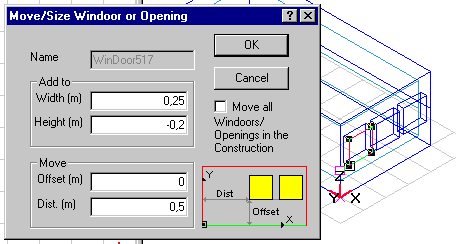
In the two groups of information in the dialog box it is possible firstly to change the size of the selected WinDoor (Add to) and secondly to move a WinDoor within the face (Move). Both positive and negative values can be entered in all the fields.
- Add to Width allows the width of a WinDoor to be changed. The new width is plotted from the origin in the local system of coordinates.
- Add to Height changes the height of a WinDoor.
- Move Offset moves a WinDoor in parallel to the y-axis.
- Move Dist. moves a WinDoor in parallel to the x-axis.
- Ticking the Move all WinDoors/Openings in the Construction will cause a collective movement of all WinDoors and Openings located in the same construction as the actual WinDoor.
The example in the figure specifies an increase in width of 0.25 m and a reduction in height of 0.2 m. The bottom is kept at the same height above the floor, but the WinDoor is moved 0.5 m in the same direction as the x-axis.