Systems, Shading
To any WinDoor in a BSim model it is possible to connect a solar shading device, which is described by the input fields shown in the figure below. The solar shading device itself is described by a limited number of parameters that define the physical properties of the device, as shown in the table below.
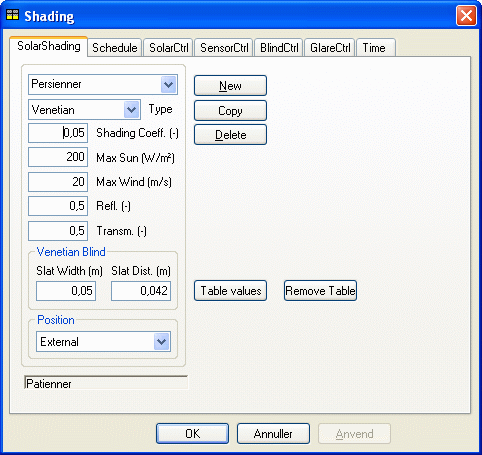
Data in BSim for the dialog SolarShading. Parameters in grey fields are only used for special types of shading devices.
| Parameter | Description | Variations | Standard value |
|---|---|---|---|
| Type | Shading type, where Simple is undefined. | Simple; Venetian; Screen; Curtain | Simple |
| Shading Coeff. | Solar shading factor, only used when simulating models created in earlier versions of BSim. | 0 - 1,0 | 0,5 |
| Max Sun | Limit for solar incidence, above which the shading is being activated to maintain this value. Only used when simulating models created in earlier versions of BSim. | 0 - 800 W/m² | 150 W/m² |
| Max Wind | Wind speed above which the solar shading is put out of activity. Only active in case of external Position for the shading device. | 0 - 30 m/s | 0 |
| Refl. | Reflectance of shading, e.g. reflectance of slates. | 0 - 1,0 | 0,5 |
| Transm. | Transmittance of shading, e.g. transmittance of slates. | 0 - 1,0 | 0,1 |
| Slat Width | Slat width, only active if the Type is Venetian. | 0 - 0,5 m | 0,05 m |
| Slat Dist. | Slat distance, only active if the Type is Venetian. | 0 - 0,5 m | 0,042 m |
| Position | Location of shading device compared to the window. | External; Internal; Integrated | Internal |
The functionality of solar shading devices is, as with any system in BSim, described in a schedule, where for one or more time definitions it is possible to define which control to use. An unlimited number of time schedules can be defined with corresponding control strategies for the solar shading device.
The following four control strategies can be selected:
- SolarCtrl, controlling the solar incidence after a set-point temperature in the thermal zone,
- SensorCtrl, controlling the shading device after the lighting level measured at the external face of the facade where the WinDoor is located,
- BlindCtrl, controlling shading devices of the type Venetian blind according to set-points for solar incidence and direct solar radiation,
- GlareCtrl, controlling the shading device to minimize glare from the WinDoor.
Table values offer the possibility of using detailed information about the slats in the shading system by attaching information from an external text file. When clicking the button, a dialog opens to find the file on the PC.
Remove table is used to remove the attachment of an external file for definition of a shading system.
See also: