Converting weather data for tsbi5
Weather data to be used by tsbi5 must exist in a special binary format. Weather data supplied as ASCII files can be converted to this binary tsbi5 format by use of the tsbi5 | File | Weather Data | Convert.
An automatic function for converting energy+/ASHRAE climate data files to the binary BSim format has been implemented in BSim from version 2002, using the tsbi5 | File | Weather Data | ASHRAE command.
This page gives a short description of the manual conversion of climate data.
Weather data
Weather data must be supplied as hourly values, day by day for a whole year, or day by day for periods of a year. Data must exist as hourly values for the different parameters, line by line in an ASCII file, stated in sequence from January 1st (or the first day of the first period) ordered by day number in the year. The name of the weather file to be used in BSim will be the same as the name of the ASCII file except for the extension, which will be DRY or TRY. Data must be given with increasing time definition, including gaps. If one, for instance, wishes to make a climate file from October to March, data must be present from January to March, then a gap, and then data from October to December.
The following data are used by tsbi5:
Location of the site the weather data belongs to.
Outdoor temperature and moisture conditions.
Data concerning solar irradiation.
Wind speed and direction.
Atmospheric pressure (simulation of multi zone natural ventilation).
Definition of weather data format
A definition file is created in the interface for converting climate data to the binary tsbi5 format. The definition file contains a number of fields, describing the format of the climate data in the ASCII file vdata.ext and that can be saved in
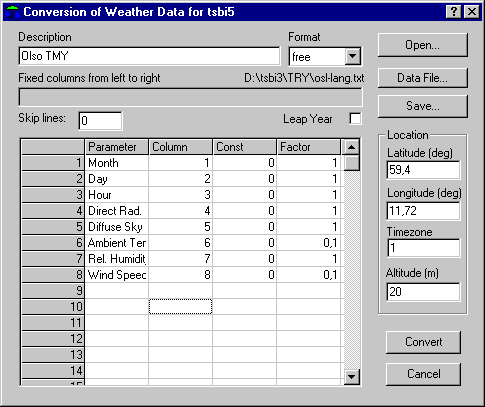
Description: Information about the contents of the climate file (the field must be filled in).
Format: It is possible to select between the following four formats:
Free: Free format means that the hourly values are set up line by line in a fixed sequence and separated by at least one blank, space, or tabulator sign.
Fixed: Fixed column where hourly values exist line by line in a fixed sequence in fixed columns with or without separating signs.
NB: If data contains non-numerical information on the same lines as the hourly data, this format is the only format that can be used.Time+free: Is a special free format. One line giving the date is placed before the 24 hourly values.
eec: Special fixed format. In the line for hour 24, the solar irradiation data gives the day sum of all hourly values. The day sums are not used in the converted file.
Fixed columns from left to right: Defines the location of data in columns (index starting with 1 at left). Used in connection with format Fixed.
Skip lines: A number (positive or zero) indicating a number of lines, which has to be skipped in the beginning of the ASCII-file. Normally this is used to skip comment lines in the head of a file.
Leap Year. Indicates that data comes from a leap year (contains data from February 29th).
Latitude: Latitude of the location (deg), positive to the North.
Longitude: Longitude of the location (deg), positive to the East.
Timezone: Standard time meridian (hours) compared to GMT, positive to the East.
Altitude: Height above sea level for measuring station.
In the rows of the sheet the individual parameters in the data file is defined one by one in the Weather Data Definition Row dialog, say which parameter, scaling and unit, as well as the relative position (parameter number or column number) in the line counted from left to right.
The following data must be present in the ASCII file for converting to a binary climate file:
Month (1 to 12)+ day (1 to 28/29/30/31) or day number (1 to 365/366) in the year + hour of the day (1 to 24).
Ambient dry bulb temperature.
One of the four combinations of solar radiation data.
Further the following can be given:
One parameter for the humidity of the air (dew point temperature, relative humidity, absolute moisture content or enthalpy). If no data is given for the humidity of the air, zero will be used.
Cloud cover will be calculated by the program from data for solar radiation and humidity if no data is given.
Wind speed and wind direction. If no data is given for the humidity of the air, zero will be used. Needed if simulation of single zone natural ventilation is going to be performed.
Atmospheric pressure. Needed if simulation of multi zone natural ventilation is going to be performed.
If the atmospheric pressure is given as 0 or omitted from input data, a fixed value calculated from the altitude above sea level is being used. It is thus still possible to simulate natural ventilation using the multi zone model, but with limited accuracy.
Format of input data
Conversion of climate data depend on existence of input data in the following units:
| Parameter | Unit(s) |
|---|---|
| Month | [-] 1 to 12 or shorter period. |
| Day | [-] 1 to 28/29/30/31 or shorter period. |
| Hour | [-] 1 to 24 |
| Temperatures | °C or °F |
| Cloud cover | fraction (0-1) or octas (0-8) |
| Solar incidence | J/cm² or W/m² |
| Enthalpy | kJ/kg |
| Absolute humidity | kg H₂O/kg dry air |
| Relative humidity | % or fraction (0-1) |
| Wind direction | ° (North = 0, East = 90) |
| Wind speed | knots or m/s |
| Atmospheric pressure | Pa |
It is not recommended to generate climate data with periods shorter than 14 days because of the thermal capacity of the constructions in the building.
Buttons in the dialog
Open : Opens an existing definition file for converting climate data. Contains information from all fields in the dialog.
Data file ... : Opens a dialog for selection of an ASCII file to convert to the binary tsbi5 format.
Save ... : Saves the actual definition file. It is possible to use a new name.
Convert : Converts the selected ASCII data file to a binary tsbi5 climate file.
Cancel : Ends the dialog without saving or converting.
Convert
Always press Save before doing a climate data conversion.
When climate data have been converted, a statistic for the new climate file is shown. The statistic shows month by month the minimum, the average and the maximum values of ambient temperature (°C), absolute moisture content (kg/kg), Normal radiation (W/m²), Diffuse radiation (W/m²), cloud cover (octas), Wind direction (°) and Wind speed (m/s).