Application
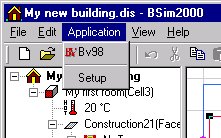
Application name(s): A list of programs that can be started from BSim.
Setup: Opens a dialog box for selecting programs that it should be possible to start straight from BSim. The programs will appear both in the Application menu and as buttons on the toolbar in the group immediately to the right of the tsbi5 icon.