Modifying the graphical presentation of results
*Under the terms of the license agreement, Danish Building Research Institute is unfortunately not permitted to supply the original help for the ActiveX application used to create the graphical presentation of the results. Therefore, the most important facilities for modifying the graphical presentation of the calculation results from tsbi5 are examined in this section.*
Right-clicking in the graphical presentation of the results opens a menu for modifying the graphics. The menu contains options for modifying the graphical presentation, including Chart Designer and Wizard.
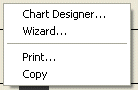
Chart Designer: Allows the graphics to be manipulated. See also the documentation from Visual Components, Inc.
Open: Allows an existing graphics file to be opened (*.vcf).
Print: Prints the graphics.
Copy: Makes a copy of the graphics on the clipboard (for pasting into MS Word – use "Paste Special..."). If not, the figures - not the graphic - will be pasted in.