Site Property
The dialog is opened by right clicking the Site icon  in the tree. If Site does not exist it can be created by right clicking the building in the tree and selecting "Add Site".
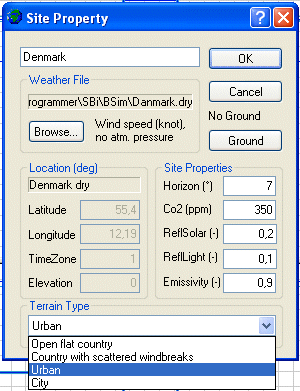
- Weather file: Shows the path to the selected climate file.
- Browse: Opens a dialog for selecting a climate file. Next to the Browse-button, information about the selected climate file is shown. If no climate file is selected or BSim cannot locate it, the dialog opens in the sub-folder Climate of the folder where BSim is installed.
- Ground: Opens a dialog for defining the virtual zone ground.
- Location shows information on the location of the climate file. If the fields are gray the information has been read directly from the climate file.
- Latitude: Shows latitude from the climate file or offers the possibility for selecting a latitude when no climate file is selected. This can be used if only calculations with XSun are desired.
- Longitude: Shows latitude from the climate file or offers the possibility for selecting a latitude when no climate file is selected. This can be used if only calculations with XSun are desired.
- TimeZone: Tells where the actual location (climate file) is located (in hours) East (positive) or West (negative) compared to Greenwich.
- Elevation: Shows the height above sea level for the station where the weather data was measured.
- Site Properties list the default values for the site used in the simulations.
- Horizon: The angle between horizontal and the skyline for the actual model in general.
- CO2: The CO2 content of the ambient air in ppm.
- ReflSolar: Reflection of solar radiation from the ground.
- ReflLight: Reflection of daylight from the ground.
- Emissivity: Emissivity of the ground/surroundings.
- Terrain Type indicates how exposed the building is to wind. The information is used when simulating natural ventilation. The following terrain types are implemented:
- Open, rural country side.
- Landscape with scattered windbreakers.
- Urban area.
- City center.