Limitations
Comparison of results from different models
If the model name is too long, it is not possible to compare results from different models in tsbi5 at the Tables tab.
- Model names must not exceed 63 characters.
Material properties for new materials in the database
If a new material is defined in the database all available input fields must be filled in for the new material. If a new material is defined in a database with moisture transport properties, these fields must be filled in. Does that not happen, the results from a simulation - also simulations without moisture transport - will be faulty as the new material is simulated as a layer of air in the construction. From BSim version 4.6.7.12 it will be considered an error and simulations cannot run until all material properties are defined.
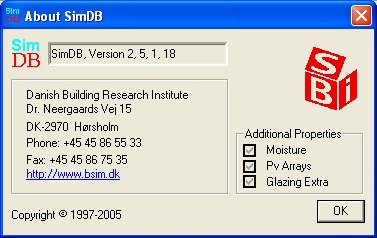
By clicking the About-button in SimDBa dialog opens showing the properties of the current database. In the example below the database contains information about moisture transport (Moisture), photovoltaic solar cells (Pv Arrays), and detailed calculation of the glass temperature in windows (Glazing Extra).
Heat transfer coefficient (lambda) in simulations with tsbi5
- A different heat transfer coefficient (lambda-value) is being used, depending on the status of the option "Moisture Transport" at the "Options" tab of tsbi5. If "Moisture Transport" is turned OFF, the value given at the "Thermal" tab in SimDb is being used. If "Moisture Transport" is turned ON, the value given at the "Moisture" tab is being used.
Time steps in simulations with tsbi5
- The number of time steps per hour expresses how fast temperature and moisture changes due to influence from systems and climate. At the beginning of each simulation tsbi5 calculates the required number of time steps to make a stable simulation. A large number does thus mean that the model is sensitive for changes in loads. If the selected number of time steps (at the Options tab of tsbi5) is less than the required number of time steps, a warning is shown with the necessary number of time steps.
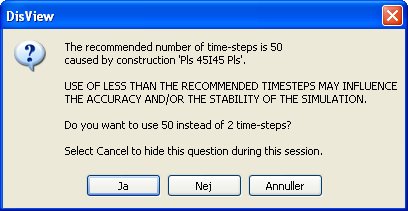
It is possible to continue using the selected number of time steps or to use the suggested number of time steps.
Comparison of results
- In some cases BSim shows the error message like "The selected file must be located in the folder 'x:\xxxxxxxxxxx' like the current log" when a new file is opened for comparison of the results in the current results file. BSim thinks that the two result files are located in different folders and can thus not be compared. The phenomenon occurs on some types of local networks. It is possible to work around the problem by ensuring that all folders in the actual path is named by no more than 8 characters and without spaces or special characters.
Solar distribution at sub-faces
With XSun turned on at the Options tab for simulations with tsbi5, direct solar incidence will be distributed geometrically correct to all sub-faces of a face (e.g. a floor divided into several sub-faces).
If XSun is turned off solar incidence will be distributed according to the individual areas of the sub-faces and the distribution key given at the ThermalZone Property dialog.
The influence from solar will thus be the same (per m²) for all sub-faces - floors, walls and ceilings, no matter where in the room the sub-face is located (e.g. at an internal wall or by a window).
Faces/rooms with large glass areas
If a simulation of the internal longwave heat exchange is to be modelled in a thermal zone or a face with large amounts of glass, care needs to taken when making the geometry and the building constructions.
Geometry should if possible be made in a way that the glass only occupies a minor part of the total area of a face in a thermal zone or face. E.g. a U-shaped thermal zone with a large window at the bottom of the U, along the facade, can be made as shown in the figure below.
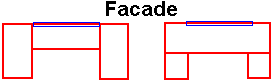
The model to the right gives a more stable simulation than the model to the left, as there is a larger area around the window to distribute the longwave radiation to.
Constructions should always be made without layers of no influence on the results of the thermal simulation. E.g. a thin maerial layer with high thermal conductivity at the outside, should be replaced with a layer of paint with the same surface characteristics as ExtConstFinish.
PV-calculations
- If no PV-material has been attributed to the PV-areas of the model, data for standard poly-chrystalline silicon is used in the calculations (system efficiency 10 % and no proportional reduction of yield because of partial shading).
Creation of faces in SimDxf
- If it is impossible to create a face between two nodes in SimDxf, the reason is probably that the two nodes do not have one common line in the CAD-drawing. In the relevant help page a work-around of this problem is described.
Long-wave radiation to the sky
- When the long-wave radiative heat exchange to the sky (on and off using the Longwave Rad. to Sky option on the Options tab in tsbi5) only the radiative exchange to the sky takes part in the simulation. There is thus no radiative exchange with eventual other buildings in the model and nor with eventual advanced parts of the building itself. The radiative heat exchange is thus only dependant on the temperature difference between any surface and the sky, respectively the ground and the tilt of the surface.
It is planned, at a later time, to implement radiative heat exchange with other buildings and advanced parts of the building itself. See also: Long-wave radiative heat exchange between internal surfaces.
VAV-control and cooling ceilings
- Cooling from ceilings or "cooling radiators" should not be modeled in conjunction with VAV-control of the ventilation system. This combination will cause too high cooling demands, as the increased air-flow will not be reduced to the normal air-flow, if the set-point for the cooling ceiling is passed. The best estimate of the cooling requirement is obtained by modeling a cooling coil in the ventilation system.
Internal WinDoors
- When internal WinDoors (WinDoors between thermal zones and rooms or other thermal zones) are to be simulated, a tick-mark should be placed at XSun Distribution on the Options tab tsbi5. It is though possible to make a simulation without using XSun solar distribution, but the results can only be used as rough estimates.
Long-wave radiative heat exchange between internal surfaces
It is only possible to simulate long-wave radiative exchange in tsbi5 in those rooms, which are convex. It is possible to create a concave thermal zone by putting together convex rooms in the same thermal zone - this configuration is legal.
Simulating long-wave radiative heat exchange between internal surfaces is turned on and off using the Longwave Radiation option on the Options tab in tsbi5. See also: Long-wave radiation to the sky.
Daylight calculations in SimLight
It is only possible to calculate daylight using SimLight in convex rooms.
In the calculations of SimLight no considerations are made to eventual neighbor rooms, say WinDoors in internal faces are treated as if they were facing the outdoors.
It is only possible to calculate daylight in SimLight in rooms with rectangular WinDoors.
Air-balance
- If an un-balanced air-stream is introduced in any thermal zone, this will automatically be balanced with infiltration or exfiltration of air from the outdoors in the tsbi5 simulations. This happens even if the thermal zone has no direct connection (faces) to the outdoors.
Systems
- Only one system (except mixing) can be present in a thermal zone at a time. Different control strategies can occur at different time definitions, but only one system can be active at any time.
XSun video recording
- Recording and replaying video sequences happens in the same size of window as BSim had during the recording (do not use full screen windows). If focus changes from BSim to any other application, i.e. using Alt + Tab, that part of this application located within the size of the BSim window will be recorded instead of the XSun animation.
- If a model is made in a way that it is possible for the sun to travel from one space to a neighbor space and back to the initial space, it will cause an infinite loop. This special case will be found and the error eliminated by stopping the sun from going into the neighbor space and back to the original space again. Doing this causes an unfixed error in the calculations.