tsbi5 - Tables
The selected parameters (Parameters) are used as hourly values for the tables and graphs displayed by clicking the Tables tab.
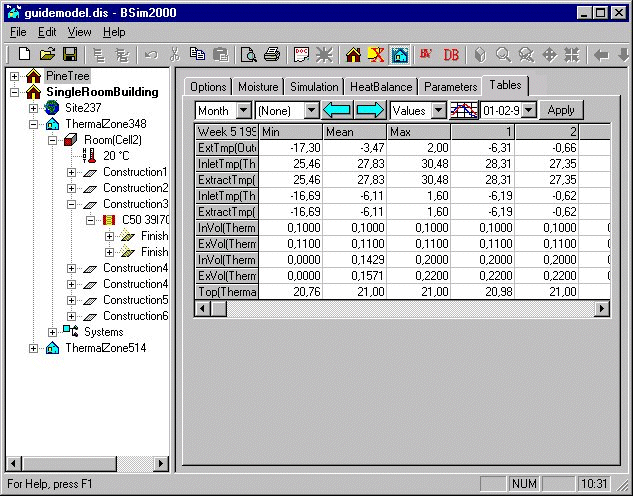
The table of the hourly values has a number of drop-down list boxes and buttons at the top. Their functions are as follows (from left to right):
Select table resolution (day, week, month or period).
Select period to be displayed, e.g. office hours. Using this with the choice of representation method, it is possible to analyze how many hours any given parameter is above or below any limit. Data in the tables are divided into 100 intervals, and it is thus not always possible to find the exact limit that is desired. In this case it may be necessary to interpolate between two values in the table.
Go to previous period (the period can be seen in the top left-hand cell).
Go to next period.
Choose between hourly values, percent under, hours under, percent above, or hours above as the representation method for the results.
Choose time from the calendar function (date, week or month) for table or graphics (depending on the resolution selected).
Manually update (Apply) the contents of the values in the tables. Only active if the check-mark Dynamic update of Tables has been removed on the Options tab.
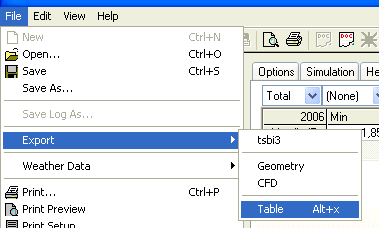
Export of hourly values from the selected period (resolution) to a .txt file for treatment in other programs, e.g. spreadsheet programs, can be made from the Tables tab. Click File + Export + Tables, or Alt+X, from the Tables tab of tsbi5 to export hourly values of the currently selected parameters over the actual period to a .txt file. The action opens a dialog for selecting a location for the *.txt file with the hourly data.
See also: