tsbi5 general options
**Note**: Standard values should **only** be changed with great care! When the "OK" button is pressed, the actual values are changed and will be used in the simulations until they are changed again.
Reset
- By pressing the Reset-button, data on the actual tab returns to those standard values that are coded into the program.
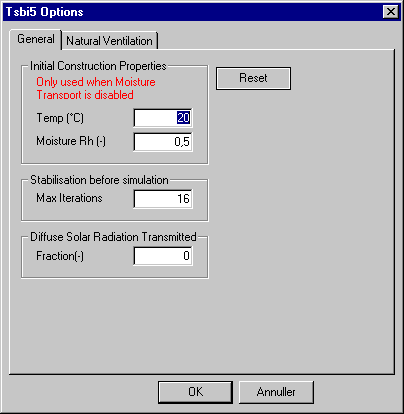
Initial Construction Properties:
Temp: The temperature of the layers in the constructions at the start of the simulation.
Moisture: The moisture content of the layers in the constructions at the start of the simulation.
Stabilization before simulation
- Max Iterations: Indicates the maximum number of iterations/days to carry out in advance of the real (saved results) simulation. The simulation starts when the stabilization criteria for the temperature or the maximum number of initial iterations has been reached.
Diffuse Solar Radiation Transmittance
- Fraction: Gives the fraction of diffuse radiation entering a thermal zone through WinDoors facing the ambient, which can be transferred to another thermal zone via internal WinDoors and openings. If "0" (zero) is given, the diffuse radiation will be distributed according to the individual area of the WinDoor/Opening compared to the total internal wall area.