XSun menu
The XSun menu is revealed by right-clicking the graphic part of the window.
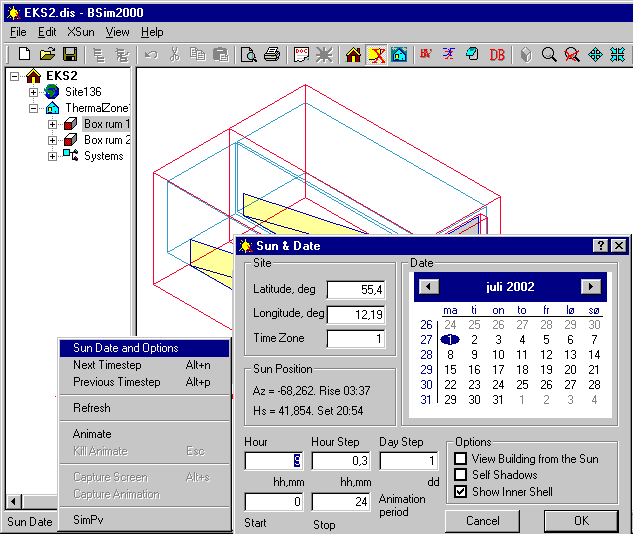
The right-click menu has changed so that it relates directly to the functions in XSun. The menu options are as follows:
SunDate: Opens a dialog box for defining the date for the analysis of direct solar radiation with the following fields:
The Site box gives information (normally taken from the climate data file) on the location of the building.
Sun Position shows the position of the sun (azimuth and solar height) at the chosen time – date and hour – of the year. Furthermore, the time of sunrise and sunset for the selected day is shown.
The Hour input field specifies the hour for which the stationary calculation is to be displayed (hours, minutes).
The Hour Step field specifies the jump size (hours, minutes) for XSun to display the position of the "sunspots" in the animation of solar distribution.
Day Step offers the possibility of selecting how many days the program will jump from the end of the animation of one day to the beginning of the animation of the next day (can be 0).
Animation period makes it possible to select a period of each day to animate. The format is hours, minutes.
Options offers three possibilities for modifying the graphic view:
A tick-mark in the View the Building from the Sun field will place the eye-point on the line connecting the building with the sun.
Removing a tick-mark in the Self Shadows box will remove shadows caused by the geometry of the building. Only direct solar radiation through WinDoors and openings plus shadows from other buildings in the model are shown.
Removing the tick-mark from Show inner shell will hide the lines indicating the internal faces of the constructions and thus make the view easier in complex models.
Next Timestep: Moves the position of the sun one step forward (defined in Hour Step) if an animation has been stopped – shortcut: Alt+N
Previous Timestep: Moves the position one step back (defined in Hour Step) if an animation has been stopped – shortcut: Alt+P.
Refresh redraws the location of the solar spots at the selected time.
Animate: Starts an animation of the position of direct solar radiation in the model one time step at a time from dawn to sunset.
Kill animate: Stops the animation of the course of the sun in the building at the current time - shortcut: Esc.
Capture Screen Shot: Records the current screen picture in a video (*.avi) file. Initiated in the XSun program menu.
Capture Animation: Records the animation at the given date to the end of a video (*.avi) file. Initiated in the XSun program menu.
SimPV: Opens SimPV for calculation of the electrical yield from building integrated solar cell systems in BSim.