XSun
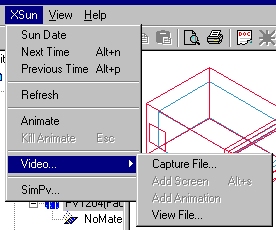
Sun Date Opens a dialog for definition of the date and time to analyze the direct solar gains in the model.
Next Time: Changes the position of the sun one time step ahead (defined in Hour Step) when an eventual animation has been stopped - short cut: Alt-n
Previous Time: Changes the position of the sun to one time step earlier (defined in Hour Step) when an eventual animation has been stopped - short cut: Alt-p
Refresh updates the graphic view of the model.
Animate: Starts an animation of the location of the direct solar beam in the model, one time step at the time from dawn to sunset.
Kill animate: Stops an animation of the solar beam position in the model - short cut: Esc.
Video... shows a sub-menu with the entries:
Capture File...: Opens a dialog for selection of a name to a video-file to save the animation of sun beams and shadows.
Add Screen: When a name for the video-file have been given the actual still picture can be saved in the video file using this command. The function can also be activated from the XSun menu
Add Animation: When a name for the video-file have been given the animation is started and saved in the file using this command. The function can also be activated from the XSun menu.
View File... opens a dialog for opening and viewing a video-file.
SimPV... opens a dialog for calculation of the electrical yield from a building integrated PV-system.