SimDB - BuildingElement
Once the data for the materials have been defined, in the BuildingMaterial section of the database, building elements can be developed on the basis of them. As previously mentioned, the building elements are classified in accordance with the overall groups of the SfB system, e.g. 21. for Walls, external walls.
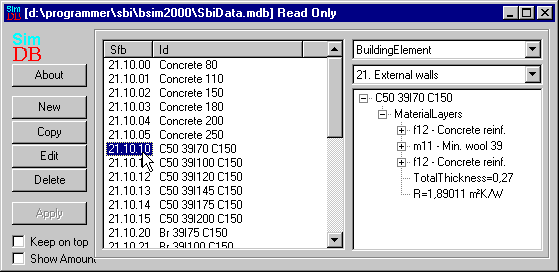
At the bottom left in the database dialog two options for the appearance of the SimDB database can be set:
A tick mark next to Keep on top ensures that the database will always be the top window. This is practical when dragging many constructions from the database to the constructions in the tree-structure.
A tick mark in Show Amount reveals tabs with information on the material consumption for one unit of account. The material consumption is used in connection with life cycle analyses, which, for the time being, is not part of the BSim package.
The information available for the element is displayed on the right of the BuildingElement option, e.g. the individual layers, the total thickness of the element and the R-value (the reciprocal U-value without surface resistances). It is possible to expand or collapse the view by clicking the small boxes containing a "+" (expand) or a "-" (collapse). Clicking the Edit button allows the building elements to be edited.
New building elements are formed by clicking the New button. This calls up a dialog box in which an overall group in the SfB system can be selected, e.g. 3x Completion and subgroup 31. External walls. Once a name has been created for the new building element (choose a good, meaningful name), the individual layers of the element can be defined using the dialog boxes that appear when the Edit button is clicked.
New building elements can also be created based on a copy of an existing building element.
Clicking the About button will open a dialog with information about the current database.