SimView – Tree Menu
By right-clicking in the tree structure on the left side of SimView, a menu is opened which provides access to various functions for editing the model at a global level.
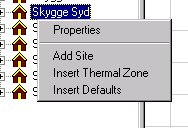
The menu entries allow the following functions to be called:
Properties, which opens the Building Property dialog for the building in the model that is currently selected.
Add Site, which attaches a site (location) to the model.
Insert Thermal Zone, which adds a thermal zone to the currently selected building in the model each time the function is called.
Insert Defaults, which opens a dialog for overwriting the default values of the constructions with the values that are currently selected. The values for the default constructions can be changed via Defaults from the SimView menu.