Energy+/ASHRAE klimadata
It is possible to download and/or convert climate data in the format used in the EnergyPlus program directly from the Internet from BSim version 2002. These climate data are generated by ASHRAE and are available for personal use in conjunction with simulations of energy and indoor climate conditions in buildings. The conditions for use of these climate data are shown at the Internet-page from where the data can be downloaded, in the zip-archives with the climate files or here.
At the site weather data for more than 800 locations are available in EnergyPlus weather format — 295 locations in the USA, 55 locations in Canada, and more than 450 locations in 93 other countries throughout the world.
To utilize this facility fully the PC must:
have access to the Internet.
have an entry in registry database with a definition of which program, e.g. WinZip, to use for opening a zip-archive (*.zip).
The dialog for downloading and converting climate data in energy+ format (*.epw) is divided into three sections.
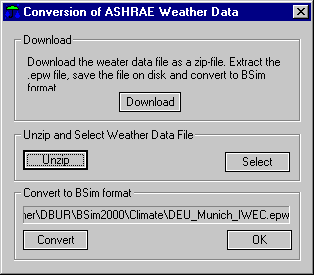
Download
Clicking the Download-button opens the standard Internet browser configured at the PC at an Internet-page with links to American, Canadian and international climate files in energy+ format.
Go to the climate file you wish to use and save it on your own PC, using the standard commands in your Internet browser. When you have saved the file(s) you like to use as .epw or .zip files on your PC, you can cut the connection to the Internet.
Unzip and Select
If a program, e.g. WinZip, for opening .zip archives is configured at your PC and you have downloaded a .zip file, you can call this program by clicking the Unzip-button. The called program is used to extract the .epw climate file from the zip-archive in the same folder as the .zip file.
When the extraction is done, the .epw file will be shown as selected in the information field at the top of the Convert to BSim format part of the dialog. If it is not shown in this field, it can be found manually by clicking the Select-button. This button should also be used if you have downloaded an .epw file from the Internet.
Convert to BSim format
The selected climate data is converted to the binary format of BSim by clicking the Convert-button. When the conversion is done a window is shown with the statistics of the climate data in the converted file. Clicking the x in the upper right-hand corner of the window closes the window.
The conversion is done in the same way as the manual conversion of climate files to BSim format. In the same folder as the climate file, BSim creates a .wdf (Weather Definition File), with the information needed to convert from .epw to *.dry format.
Clicking the OK-button closes the dialog.