File
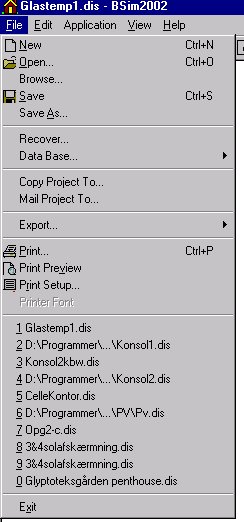
- New: Starts the wizard to create a new model. The user is asked whether the current model should be saved before the software switches to creating the new model.
en\13tsbi5_thermal_simulation\13_14_Chart_Wizard.md
Open ...: Opens a dialog for opening an existing project
Browse...: Opens a dialog with preview of model geometry to find and open existing models.
Save: Saves the model under its current name. A back-up file is created when this function is used.
Save As ...: Saves the model under a new name. A back-up file is created when this function is used.
Recover: Opens a dialog box that allows a backup copy of the model to be opened if the program has crashed for one reason or another.
Data Base ...: Allows a new default database and a new model database to be selected.
Copy Project To ...: Creates a copy of the actual project in another folder and eventually a new name. The correct data base is copied to the same folder as the project.
Mail Project To ...: Opens the standard e-mail application for sending a new e-mail and attaches the current model and database to the e-mail. The database file will automatically be renamed to *.disdb to avoid removal by the e-mail security system.
Export ...: (When SimView is active!):
Radiance: Saves the model geometry and eventual informations about surface properties in an external file which can be read into the Radiance program.
DirectX: (from BSim version 2002) Saves the geometry in an external file (*.x) which can be read into a graphics program supporting the DirectX technology.
Bitmap: When the 3D image is active - left click in the 3D image to activate - a bitmap (*.bmp) graphic file of the graphic can be saved to disk.
Export ...: (When tsbi5 is active!):
Save Log As ...: (appears only when tsbi5 | Options is active) Saves the results log in a new name. The function is useful for analyses of parametric variations.
tsbi3: Saves the model in a format that can be opened in the tsbi3 program
Geometry: Saves the geometry (coordinates for all faces) for use in model description in a CFD program
CFD (only possible when the Tables tab of tsbi5 is active): Saves the results of a tsbi5 simulation as boundary conditions for a CFD program
Weather Data: (when tsbi5 is active):
Convert: Opens a dialog for Converting Weather Data in ASCII (text) format to the binary format used in tsbi5.
ASHRAE (from BSim version 2002 only): Opens a dialog for download and automatic conversion of free ASHRAE climate data from the Internet.
Print: Prints the documentation for the model corresponding to ModelList.
Print Preview: Displays the printout of ModelList on screen.
Print Setup ...: Opens a dialog box for changing printer and printer properties.
Printer Font: Opens a dialog box for selecting a font for printing ModelList.
1, 2, 3 and 4: The names of the last four projects to be opened. Clicking one of the names opens the project.
Exit: Closes BSim.