Reference point
It is possible to define several reference points in a room to control the artificial lighting from these different points. The calculation and transfer of the solar light factors is made using SimLight.
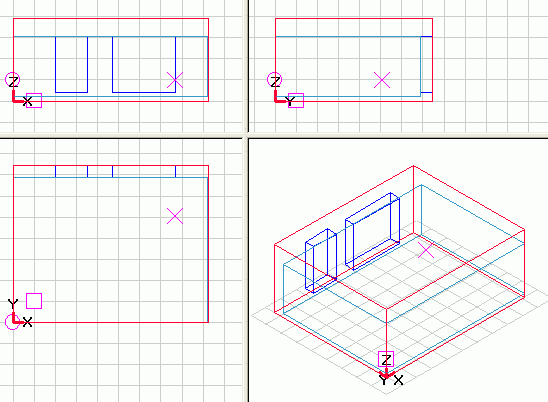
The actual reference point is shown in SimView as a X. It is possible to move the reference point by double-clicking the left mouse-button in one of the 3 sections or by holding the Ctrl-button while dragging the reference point with the left mouse-button pressed.
Reference points are made for each separate room in the building model by right-clicking the room and selecting Ref Points.
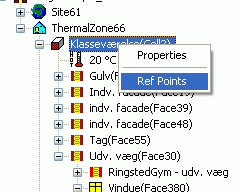
Doing this opens a dialog with information about the coordinates for the actual reference point. Clicking New will create a new reference point with the coordinates for the actual reference point. Remember to give the new reference point a good name so it is easy to identify when needed in the control strategies for systems.
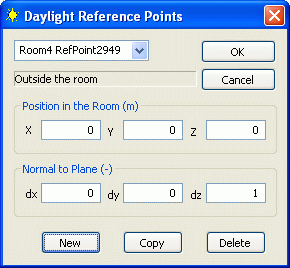
- Position in room: Defines the location of the reference point in the global coordinate system of the building model.
- X: X-coordinate of the reference point.
- Y: Y-coordinate of the reference point.
- Z: Z-coordinate of the reference point.
- Normal to plane: Defines a vector perpendicular to a plane in the room, pointing in the positive direction at which the reference point is located. A normal vector with the values 0,0,1 represent a horizontal plane where the reference point looks upwards.
- dx: X-coordinate of the normal vector to the reference plane.
- dy: Y-coordinate of the normal vector to the reference plane.
- dz: Z-coordinate of the normal vector to the reference plane.
- New: Creates a new reference point with "0" for all values, except dz.
- Copy: Creates a new reference point as a copy of the current reference point.
- Delete: Deletes the current reference point from the model.