System, DayProfile
The most frequently used control is of the day profile type, which is described below. The other control types are described under the individual systems to which they can be attached.
For each period of the day for which a particular load is to be specified the load is entered as a whole number with a percentage sign followed by the time period during which this load is to apply. There must be a space after each time definition and before the next percentage.
If the same hour is specified twice in the day profile, the load for the last definition will apply, e.g. the profiles 50 % 1-24 100 % 8-16 and 100 % 8-16 50 % 17-7 are identical.
Several schedules with connected day profile and time definition can be specified, making it possible to simulate different load variations on different days of the week, month or year. It is also possible for different components to refer to the same day profile, and the combination of day profile and time definition allows a wide range of possible variations for component "control".
A day profile specifies when in the course of a 24-hour period a simple system is in operation and what proportion of the nominal load is allocated in each hour. It is possible to specify a percentage greater than 100, but in this case tsbi5 will allocate a power equal to the nominal load. Similarly, it is possible to specify a percentage less than 0, but tsbi5 will allocate 0 power.
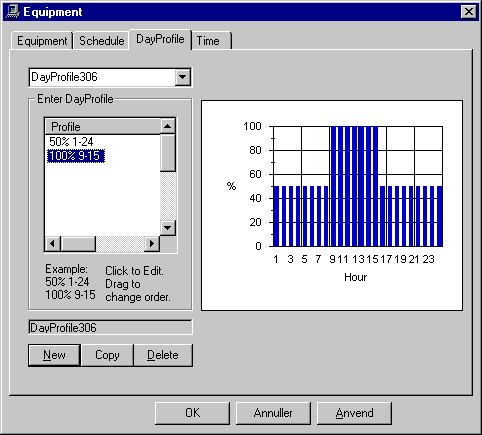
Information on the composition of the day profile is entered in the Profile input box line by line. The software reads the table from the top. If the same hour is specified twice in the day profile, the load for the last specification will apply. It is possible to change the order of the lines by holding the left mouse button down and dragging the line in question to a new position. The values entered are shown in the graph on the right of the dialog box.
See also: