Systems, Time
All forms of schedules for systems include one or more time definitions. Each time definition is linked to a single control action and specifies when the system is to implement that control action.
The time definition specifies the weeks (or months), the days and hours when the current component is to be active and carry out the attached control action.
The operating period for a ventilation system can, for example, be described by means of a time definition in which omitted weeks could correspond to the Christmas, Easter, summer or autumn holidays. The days correspond to all weekdays (Monday to Friday), and a time definition might, for example, be normal school hours plus four hours of evening classes.
The weeks are numbered from 1 to 53 and the days from 1 (= Monday) to 7 (= Sunday). The hours are numbered from hour 1 to hour 24, with hour 1 corresponding to the period from midnight to 1 a.m. Time periods of less than 1 hour cannot be specified.
The time definition determines when systems can be in operation. Control, which can take the form of a day profile or more complex control dependent on one or more parameters in the model, determines whether the system is in operation.
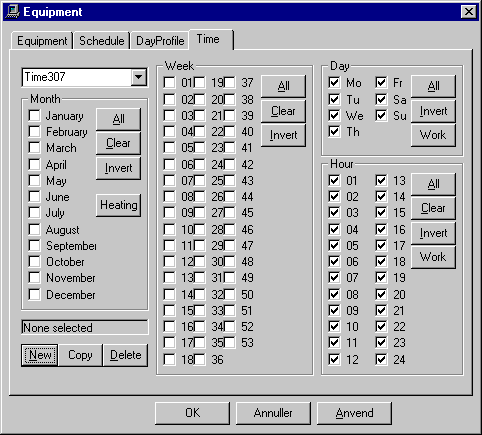
The time definition is divided into four fields labeled Month, Week, Day and Hour. The Month and Week fields complement each other, as either the months or the weeks in which the system is to be active have to be selected. The Day field is used to select the days of the week on which the system can be active (Monday (Mo) to Sunday (Su)). Similarly, the Hour field is used to select the hours during the day in which the system can be active.
There are three special buttons in the dialog box: Heating (under Month) and Work (under Day and Hour). The first indicates the heating season, while the last two indicate working hours.
From BSim version 3.2.8.16, a tariff system was introduced for energy consumption. The energy consumption at thermal-zone level can thus be divided into eight different tariff classes (Tariff 0 - Tariff 7). The tariff system is attached to energy-consuming systems: Heating, Cooling, Equipment, Lighting and Ventilation.
The tariff-class is attached to a time definition:
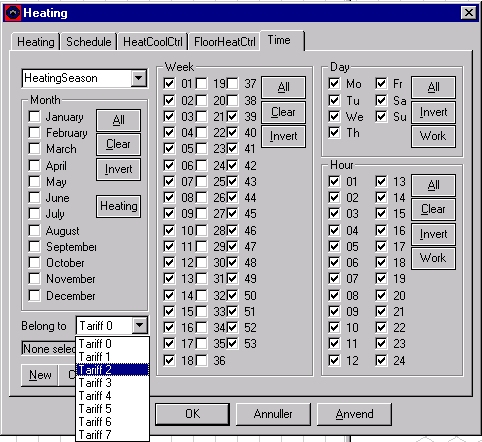
By default, a time definition belongs to the first tariff class (Tariff 0).
The energy consumption from a system within a tariff class is counted within this tariff class. The energy consumption for a given tariff can be analyzed from tsbi5/Tables.
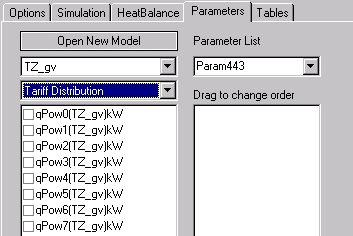
In tsbi5/Parameters a new group of parameters is found 'Tariff Distribution'. Here it is possible to select qPow0 - qPow7, corresponding to the energy consumption for the tariff classes 0 - 7.
See also: Schedule