Adding solar cells to the model
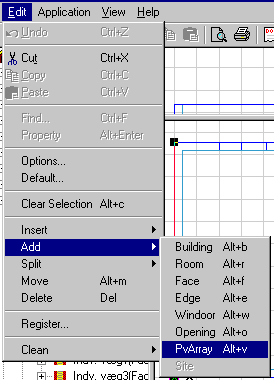
Solar cells are added to the building model in the same way as WinDoors. A face to contain solar cells is selected with a local coordinate system in the face. In this coordinate system the solar cells are placed. The function for adding solar cells to a surface is called from the Edit menu under the entry Add + PvArray.
The PV-area can be defined either as the areas of the individual panels with a distance between or as the area between the centerlines of the mounting system. Which method to use depends on the geometry of the mounting system.
If the edge shading the active PV area of the panels is located "inside" the area of the panels (point "b" in the figure below), the area of the panels should be used.
If the shading edge is located "outside" the panel area (point "a" in the figure below), the area between the centerlines of the mounting system should be used as solar cell area.
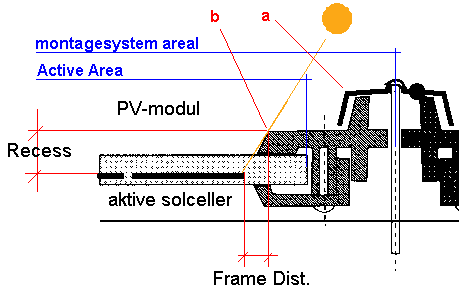
When the areas with solar cells have been located in the building model according to the definition above, it is possible to define local shadings (from the frames of the panels or the mounting system) to take into account in the simulations. These shadows are defined by a Frame Dist(ance) and a Recess, in a similar way as it is done for WinDoors.
Frame Dist. makes it possible to define the distance — at the level of the solar cells — from the active cells closest to the edge to the point causing the first shadow on the cell (point "a" or "b" in the figure above).
In contrast to WinDoors, it is possible to define a Recess larger than the thickness of the construction holding the solar cells. Recess is treated as an extension compared to the face of the solar cells. It is assumed that Recess is equal on all edges of the solar cell area.
In total, Frame Dist. and Recess describe the shading angle between local edges and the active solar cells located closest to the edge of the panels. Frame Dist. and Recess are defined in the property dialog for each area with solar cells, as shown in the figure below.
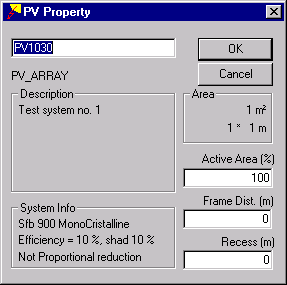
Active Area is the part of the geometric area of the solar cell panels, which is equipped with active solar cells and determines the Fpv factor. Active Area is used in the simulations as the area where the solar rays are transferred to electricity. The parameter Active Area thus gives how large a portion of the total area consists of active modules.
If the geometric area is given based on the model measures of the mounting system (shadows from point "a"), the portion of active cells should be calculated according to the area between the system lines of the mounting system. If the area on the other hand is given as the individual area of the modules, Active Area should be given as 100 %.