SimView - Oprette en bygning
A building can be created or added by right-clicking in the window with the geometric model view. This calls up the SimView menu, where the Add Building option should be selected (Edit | Add | Building can also be used). When a building is first created, it will contain one space. This really means that a building is created at the same time as the first space.
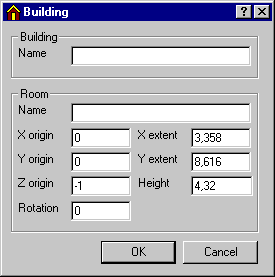
The dialog box for creating a building contains 10 fields for entering data:
Name: The name of the building (choose a sensible name that can be recognised later!).
Space Name: The name of the space that is being created at the same time (choose a good name!).
X origin: The origin for the east axis in the non-rotated system of coordinates.
Y origin: The origin for the north axis in the non-rotated system of coordinates.
Z origin: The origin for the Z-axis (up) in the model's system of coordinates.
Rotation: The building's rotation in relation to the global system of coordinates (in degrees), clockwise is positive.
X extent: The extent of the building in the x-direction – east if the system of coordinates has not been rotated (metres).
Y extent: The extent of the building in the y-direction – north if the system of coordinates has not been rotated (metres).
Height: The height of the building (metres).
The measurements describe the location of the system lines in the model. When constructions are subsequently attached to the individual faces, they are plotted according to the following convention.
External walls are plotted from the system line inwards.
Internal walls are plotted with the system line as the centre line.
Attention must be paid to this convention when defining the geometry of the model.
See also: