Edit
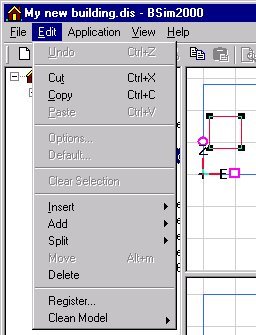
Undo: Undoes the last major change in the model's geometry.
Cut: Cuts out an element and stores it on the PC's clipboard for subsequent pasting in another place. This function should be used with care.
Copy: Copies an object and stores it on the PC's clipboard for subsequent pasting in another place. This function should be used with care.
Paste: Inserts the contents of the clipboard.
Options...: Opens the dialog box for changing the software settings. If tsbi5 is active a dialog for viewing and changing standard parameters for tsbi5 is opened.
Default...: Opens a dialog box for attaching default constructions and the database from which they are selected by holding the left mouse button down while dragging the construction to the Default dialog box.
Clear Selection: Deselects any objects selected in SimView.
Insert: Inserts the following objects into the model:
Add: Opens a sub menu for:
Split: Opens a dialog box that allows:
an edge to be split by creating a new point (vertex) in the middle of the edge,
a face to be split between two selected points (vertexes).
Move: Opens a dialog box for moving a face in parallel to the face's normal vector.
Delete: Deletes a selected object from the model.
Register: Registers .DLL and .OCX files for use by BSim. This normally happens automatically during installation of the software suite.
Clean Model: Allows to choose between two functions to tidy the model:
- Model removes surplus information and objects from the model, Geometry cleans the geometry i.e. by combining vertexes with a distance less than the "snap" distance (see Options).