View
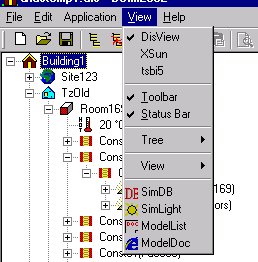
DisView: Switches to the program interface for SimView for model editing.
XSun: Switches to the program interface for XSun for calculating and visualising incident solar radiation and shadows.
tsbi5: Switches to program interface for tsbi5.
Toolbar: Shows or hides the toolbar.
Status Bar: Shows or hides the status bar (the wide bar at the bottom of the program window that displays a brief explanation of the highlighted menu option).
Tree: Allows the view of the model in the tree summary (on the left of the program window) to be collapsed or expanded and the view of the model to be updated.
View: Gives access to a submenu with the following options:
Auto Scale: Scales the view automatically.
Zoom In: Zooms in on the model (shortcut: "+").
Zoom Out: Zooms out so that the model is seen from further away (shortcut: "-").
Viewpoint: Opens a submenu for changing the isometric view of the model (shortcuts: right arrow, left arrow, up arrow, and down arrow).
Arrange: Arranges the view within the defined Bounding Box.
Expand expands the area (the grid in the 3D view) shown.
Collapse collapses the area (the grid in the 3D view) shown.
Update: Forces the model view to be updated.
SimDB: Calls up the database.
SimLight: Switches to the program interface for SimLight.
ModelList: Switches to the model list information view.
ModelDoc: Switches to the model documentation view, sorted on buildings, thermal zones, rooms, faces, systems, schedules etc.