SimView - Options
The general data for the model view and program setup can be adjusted in the Options menu.
Some changes in the options will not come into action until next time BSim is started.
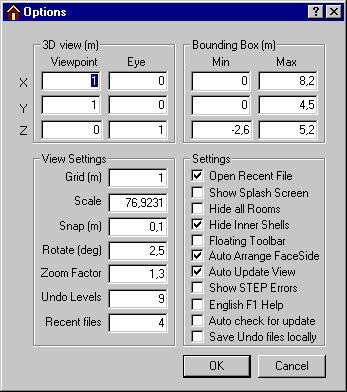
In Options a number of details affecting the view of the model can be set:
3D view
- Position of viewpoint and eye-point.
Bounding Box
- Outer limit of model defined by two points in the 3D space.
View Settings
Grid spacing in meters.
The scale of the geometric view.
How close the mouse cursor has to be to an object to be able to snap it in meters.
How many degrees is the model rotated at a time (Rotate).
Zoom factor specifies how many times the graphical view should be enlarged or reduced when zooming in on or out from the model.
Definition of how many revisions of the model's geometry should be saved as a backup while constructing the model (Undo Levels). The backup is saved under the same name as the model, just with a dollar sign ($) in front. The default value for undo is 3.
Recent Files indicates how many of the most recent opened models that are shown at the bottom of the File menu.
Settings
Program start-up with last model to be used (Open Recent File)
Copyright information displayed at program start-up (Show Splash Screen).
Hide all Spaces. Choosing to show a single space at a time improves the clarity of large models.
Hide the thickness of constructions (Hide Inner Shells) - improves clarity and reduces update times in the case of large models.
Floating toolbar allows the toolbar to be located (dragged using the mouse) anywhere on the screen. This function will not come into action until next time the program is started.
The Auto Arrange FaceSides option ensures that:
surfaces towards Outdoor or Ground always have face side 2 facing these zones.
Internal floors (divisions) always have face side 1 facing the upper room.
Auto Update View forces an automatic update of the graphical view (thickness) when a construction is attached to a face.
Show STEP Errors will reveal errors found in the model during file opening. STEP-errors will normally only occur when the program is updated (the model definition) and an "old" model is opened with the new version.
English F1 Help allows users of PC's with both the Danish and the English User's Guide installed to use the English version as default when pressing F1. By default F1 opens the existing language version of User's Guide, if only one version is present in the BSim folder.
Auto check for update: With this option turned on BSim will check automatically for new updates at www.bsim.dk when the program opens.
Save Undo files locally: If this option is turned on, temporary files for undo will be saved locally PC in the path defined by the TMP/TEMP variable (typically C:\TEMP). Faster when BSim is running from a network folder. If not given, the files will be saved in the same path as the actual model.
See also: