Daylight calculation at a point
The reference point (marked by an X in plan and sections in SimView) is transferred automatically to SimLight. The position of the reference point in the building can be changed by entering it in the dialog box or by double-clicking or shift-clicking one of the windows (the plane and/or the sections). The location of the reference point is given in the tree (x, y and z) position fields of the SimLight dialog. The orientation of the reference point is given as the normal to the plane and can be changed in the dialog box. If a reference point has been defined earlier for the current space, its position is shown under recent pos*. Click the recent button to reuse this point.
It is possible to choose among the already defined reference points in the current room. Multiple reference points can be created by right-clicking the current room in the tree structure and selecting the entry Ref. points.
Whenever one of the graphic windows is double-clicked, a new calculation is started for precisely the point selected. Clicking the Calculate-button or one of the three precision settings for calculations (Low, Medium, High) starts the calculation for the point currently selected.
If the Keep on top box is checked, the dialog box will remain at the front on the screen and the position of the reference plane can be changed by double-clicking in the plan and elevations. The daylight factors for each new position of the reference point will be recalculated automatically.
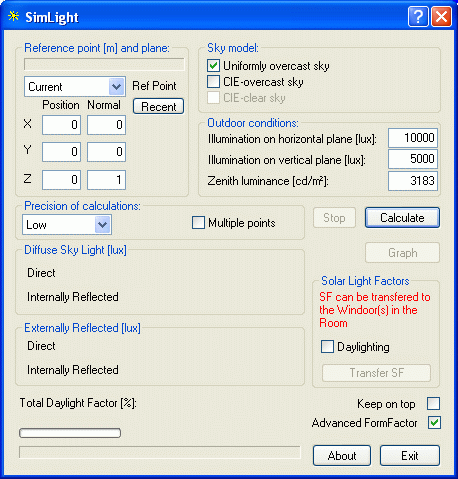
The results, which are displayed at the bottom of the dialog box, include the amount of direct light, the amount of externally reflected light, the amount of internally reflected light (all in lux) and the total daylight factor at the reference point (%).
The program does also calculate the solar light factors (SF1, SF2 and SF3) for all WinDoors in the space and they can be transferred automatically to the WinDoors of the space by clicking the Transfer SF button. The Transfer SF action saves the coordinates of the reference point for the current space. This means that solar light factors for each space can be calculated - the reference point saved - and transferred one at a time for the whole model. The transferred solar light factors are shown in the WinDoor Property dialog when right-clicking the WinDoors of the space in the tree structure.
Putting a tick-mark in the field Daylighting under Transfer SF transfers a secondary set of solar light factors from a secondary reference point (which must be defined in advance of the calculation) for later use in control of solar shading systems.
The tick-mark Keep on top makes it possible to keep the dialog on top of the display. This allows the reference point to be moved (drag or double-click in the plane and/or the sections) and causes an automatic recalculation of the daylight conditions for the new reference point.
Advanced FormFactor gives access to select a more advanced method for calculation of form factors as a replacement for the normal method. This is specially useful if the results seems to be meaningless.
The calculation time increases as the precision of calculation is increased. Provisional trial runs with the software indicate that the calculation error in ordinary cases (simple, box-shaped spaces) is <10 %, <5 % and <2 % for the three levels of precision. The error in the results is largest for the amount of inter-reflected light and smallest for the amount of direct daylight. If reference points very close to a face are chosen (<5 cm away), high precision should be selected. The calculation time is roughly doubled whenever the calculation precision is increased.
Ticking the Calculate for multiple points box opens a dialog for definition of a plan for calculation of the daylight level.
At the bottom left of the dialog three information fields are shown:
Diffuse Sky Light (lux): Light intensity at the reference point from diffuse sky radiation, including the direct and inter-reflected components.
Externally Reflected (lux): Light intensity at the reference point from externally reflected light from the ground, including the direct and inter-reflected components.
Total Daylight Factor (%) gives the total daylight factor, calculated for the actual location of the reference point (shown as a purple cross in the graphical view of BSim).
See also: