Move: Building
A building in the model can be moved in the global coordinate system by selecting the building in the tree structure and using the Move entry of the SimView-menu. This opens a dialog for defining the distance (in meters) to move the building in the X, Y and Z directions.
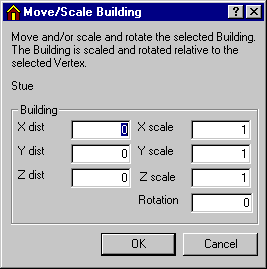
If a vertex of a face is selected (shift+click or double-click) in advance of the Move operation, the input fields at the right of the dialog will be active. This offers the possibility of changing the proportions (scaling) of the building in the 3 major axes directions (X, Y, Z) and rotating the building around a vertical axis through the selected vertex. When changing the scaling, the values of all vertices in the actual axis direction will be multiplied with the scaling value.