Climate data
A calculation cannot be carried out with either tsbi5, XSun or SimLight without an attached climate file. The climate file is attached to the building by right-clicking the building in the tree summary and clicking the Site button, which brings up the dialog box for selecting climate data.
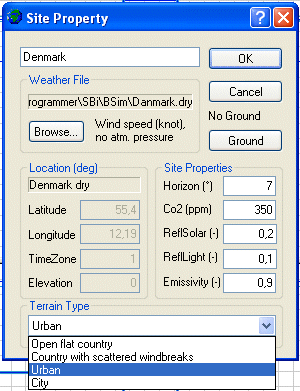
It is possible to search the computer manually for files containing climate data by clicking the Browse button. New has to be clicked before a climate file can be selected. At the right of the Browse-button, information about the content of the selected weather file is shown.
If an analysis of incident solar radiation with XSun is all that is to be carried out, it will be sufficient to complete the data in the Location group instead of selecting a weather data file.
If a weather data file is selected, information for the Location group is taken from it and the data fields are displayed in gray. The geographical position of the building is specified in Location using Latitude, Longitude and TimeZone. The time zone is positive moving eastwards, i.e. Denmark is in time zone 1. Elevation is the height above sea level for the station where the climate data have been measured.
The general horizon cut-off (Horizon), reflection of solar radiation (SolarRad.) and reflection of daylight (Light) from the surroundings can be specified in the Ground Reflectance group of data.
Clicking the Ground button opens the dialog box for defining outdoor conditions for the ground under the building.
Climate data can be generated from a text (ASCII) file with hourly values for relevant climatic parameters.
See also: