Mixing Control
The control action is dependent on:
the operative temperature in the current zone
the difference in operative temperature between the current zone and the zone from which the air is transferred
the outdoor temperature
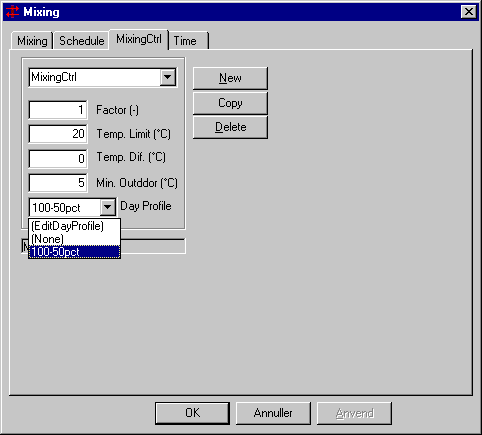
Factor defines the fraction of the nominal air-flow (defined on the Mixing tab) available in the matching time definition. Factor can be values between 1 and 0.01.
Temp. Limit specifies the limit value for the air temperature in the current thermal zone.
Temp. Dif. is the difference between the operative temperature in the thermal zone or space from which the air is taken and the current thermal zone. Otherwise the value can be both positive and negative.
If a temperature difference of 0 is entered, mixing will be active within the time definition if the outdoor temperature is above the limit Min. Outdoor.
A positive value indicates that heat is to be transferred from the adjoining thermal zone or space to the current thermal zone. Mixing will be active - within the time definition - if the air temperature in the thermal zone is lower than Temp. Limit + Temp. Dif.
A negative value indicates that "cold" is to be transferred from the adjoining thermal zone or space to the current thermal zone. With this form of control mixing could function as "night cooling" in the case of natural ventilation. Mixing will be active - within the time definition - if the air temperature in the thermal zone is higher than Temp. Limit + Temp. Dif.
Min. Outdoor specifies a limit value for the outdoor temperature. Mixing will only be active if the outdoor temperature exceeds the value entered for Min. Outdoor. Min. Outdoor can, for example, be used to ensure that unwanted cold replacement air is not added to the "donor zone" (by infiltration) in place of the air lost through mixing. The value of Min. Outdoor has the highest priority for controlling the mixing. If an unconditional case is to be modelled, the value of Min. Outdoor must be lower than the minimum outdoor temperature of the used climate file.
Day Profile offers the possibility of connecting a day profile to the control of mixing so it is possible to vary the possible size of the air-flow over the day. The entry EditDayProfile in the selection box allows for editing an existing or creating a new day profile. If None is selected in the box, no day profile is attached to the control of the mixing, and the air-flow is thus only depending on the above described parameters.