SimDB - BuildingElement, ConstructionLayer
The second tab contains information on the individual layers, which make up a building element. It has the following input fields:
Type: Building materials can be selected from the various basic SfB groups (insulation materials are in the Inorganic materials group, for example) as defined in the BuildingMaterial part of the database.
ConstructionMaterial: The construction material is chosen from a list containing materials of the type selected in the Type field.
Three unnamed fields with a different meaning depending on the type of building element – WinDoor or other elements.
Field 1 (grey) indicates which material entry (SfB) that defines the current material layer.
Field 2 indicates the thickness of the selected materials. Displayed in the Thickness column in the table at the bottom of the tab.
Field 3 indicates an extra resistance between two material layers. The resistance has different meanings, dependant on the way the layer is defined:
If a material has been selected for the actual layer, the resistance is a thermal resistance [m²·K/W], i.e. as a closed air-filled enclosure between two layers of material.
If no material has been selected, the resistance is a moisture resistance [m²·s·Pa/kg] of the actual material equal to a vapour barrier. A table with typical moisture resistance is shown at the page dealing with sorption/desorption.
- If no material is selected and no resistance is given, the material layer is the geometric definition of an air-layer, e.g. a suspended ceiling. In this case the thermal resistance of the air-layer must be given as a resistance at the previous (counted from face 1 of the construction) material layer.
If one wishes to simulate the moisture transport over such an air layer, i.e. a cooling ceiling, the following assumption can be used:
If the air is not moving, which can be acceptable, if the lower boundary is the coolest and there is no forced convection. The the resistance og diffusion will be the thickness of the air layer (meter) divided by the moisture permeability for air (1.85e-10 kg/m·s·Pa).
In the second case (i.e. in the winter, when the cooling ceiling is off and the roof face is the coolest), the equivalent resistance of diffusion assumabaly will somewhat lower, i.e. 0.1e+9 m²·s·Pa/kg, but presumably varying.
Normally it will only be of interest to know the approximate value when the cooling ceiling is on, equal to case 1.
Table summarising the individual layers of the element.
Information field (bottom right) giving guidelines on how some of the input fields should be understood.
It is possible to change the order of the layers in a construction by dragging a material layer to a new position. The material layers appear in the same order as shown in the table, counted from face side 1 of the construction. It is recommended to create a copy of a construction, if the material layers are to be changed, as the changes will occur anywhere in any model using the same database.
An air layer, e.g. a suspended ceiling, can be defined geometrically by not selecting a material for a new layer (shown as "No material" in the table) with the correct thickness. The thermal resistance of an air layer must be given at the material layer at the innermost side of the air layer (closest to face 1 of the construction).
A new layer is added by selecting New Layer, clicking "?" in the Material column, selecting Type and ConstructionMaterial and then defining thickness, thermal resistance of an eventual cavity, and the sequence of layers.
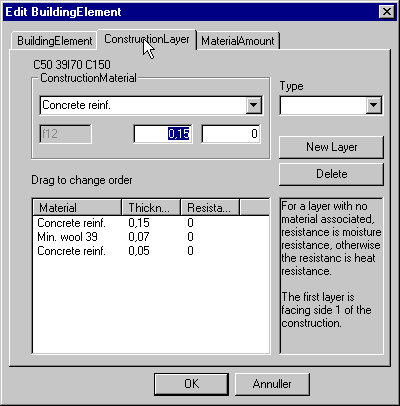
Clicking the Delete-button will delete the current material layer from the construction.
Right-clicking the material opens the dialog box for editing the material's properties.
WinDoors are defined in the same structure in the database as the other constructions, but the three unnamed fields and columns have a slightly different meaning.
See also: